
Wellingtoncrab
-
Posts
625 -
Joined
-
Days Won
42
Everything posted by Wellingtoncrab
-
[Feature Proposal] Frob to Use World Item
Wellingtoncrab replied to Daft Mugi's topic in The Dark Mod
I was typing on my phone earlier so didn’t say everything I wanted - just want to add it’s really appreciated that you took some time to look at this and are offering something that helps new players. -
[Feature Proposal] Frob to Use World Item
Wellingtoncrab replied to Daft Mugi's topic in The Dark Mod
Weird how you never commented on how there are several missions which require you to shoulder a body? Maybe because it wasn’t a pretext for you to bring this up again? I imagine it definitely would have. I will give it a look when I get a chance! The drag body function still exists - you are right to point out a mission requires it but saying it is ruined is a bit strong imo, though I don’t recall the specific example in this case. It fair to say it would be in the place PD3, Volta 2 and TPW are today. -
[Feature Proposal] Frob to Use World Item
Wellingtoncrab replied to Daft Mugi's topic in The Dark Mod
This just isn’t a true description of the scope as lined out in the original post. Why is it that you feel there is reason enough that you get to decide to just change this? Why is a change which is completely backwards compatible with the existing control scheme “radical”? It is clear in this thread there are players that want this, and anyone who doesn’t doesn’t have to use it. Why at a minimum can’t it go out for testing with more players in a proper dev build like the frob highlight did? -
[Feature Proposal] Frob to Use World Item
Wellingtoncrab replied to Daft Mugi's topic in The Dark Mod
This is another point which been gone over again and again in the thread and doesn’t need more elaboration. Two additional users just pointed out that frobbing is a context sensitive action that is already not “consistent”. There are lots of moveable objects for example that already don’t work like you are describing. Inventory items like keys are also moveables. The primary action is to acquire them. If you wish to interact with them as you would another moveable you must drop them first at which point they appear in front of the player as other physics objects do. No one complains about this not being consistent, as it would be tedious and potentially confusing to need two key presses to acquire most moveable inventory items, many of which are required to progress in the game, just like it is tedious and potentially confusing to do this with bodies. It is TDM which is not consistent with games like Thief TDP/2/3, System Shock 2, Deus Ex, Dishonored, etc. Maybe this is in part why it is confusing, as there is a good chance people coming to TDM will have some familiarity with those games. Thanks for your understanding. -
[Feature Proposal] Frob to Use World Item
Wellingtoncrab replied to Daft Mugi's topic in The Dark Mod
Impossible to miss. Read their feedback. Anyone playing the game knows to interact with things that are highlighted and that the primary way to interact with things is to frob them. What they don't know is there is an entirely different control layer in the game which provides different interactions: "use item to shoulder" being the example we are discussing. Long press is still a complex input in this regard and it is not the proposed solution to the added complexity in the game, it is a proposed way to manage that complexity from a single input. It is the tying of the familiar input (frobbing) to the familiar result (interacting with a body to shoulder it), and then tying the unfamiliar "new" input (long frob/double click/use item/etc) to the unfamiliar "new" result (using a interaction modifier to do fine grain manipulation of the body) that is a potential solution to this. That is not to claim it is perfect. Shouldering/dropping bodies is an essential player action. There are missions, such as volta 2, where shouldering a body is essential to complete the mission. There is no example I am aware of where fine manipulation of a body is ever essential - it is a nice additional layer of control. So why is fine control of bodies the first thing many players will learn? Maybe because the mod launched without shouldering or something? (I played it when it came out and am not sure if this was the case or like these new players I just didn't know it was possible, but I used to just drag bodies everywhere) Maybe it was to show off some of the physics interactions that were new to the mod vs thief? I am not sure. I am sure it is not working for some players. It did not work for me. When I came back to try the mod in 2019 it took many missions for me to stumble upon this input combination (I remember it quite clearly - it happened on accident while I was playing my now favorite mission “Perilous Refuge”). And yes I had played the training mission - multiple times. -
[Feature Proposal] Frob to Use World Item
Wellingtoncrab replied to Daft Mugi's topic in The Dark Mod
I think daft said he would consider a variable to try and cover you. It'd be nice to see you acknowledge that you understand while this is your preference it nullifies one of the primary goals of the patch which is to address specific feedback we see from new players who are giving up on playing the game. That is because what seems consistent to you is actually inconsistent with any other game like this they have played. Apologies, it is quit tiresome to emphasize this aspect of the patch over and over again. Everyone respects your preference and understands your feedback, to the point that full backwards compatibility with the original controls has been in the patch since the very beginning and as mentioned daft already said he would consider an option for you. It's just very hard to tell if you do not care about solving this particular problem (which is fine), or you just don't understand at all what the patch is attempting to achieve (also fine). Either way you are asking over and over again to undo this aspect of the patch and never providing an alternative that addresses the same problem. Agreed - my experience is that it feels completely natural to me. Frob being a contextual action - if an object is highlighted in your view you interact with it, if there isn’t one you drop the body. i haven’t run into issues with not being able to interact with doors or even very small buttons like snatcher was describing. Since all the original inputs also still work you actually have multiple options for dropping or snuffing candles you are holding. -
[Feature Proposal] Frob to Use World Item
Wellingtoncrab replied to Daft Mugi's topic in The Dark Mod
This, just like click again to drop a body, is already included in the patch. If a switch, button or door are highlighted you will interact with them without dropping the body. There are probably more objects this would need to cover which will come up with more testing (readables maybe?) Seems like elements of the patched executable aren’t working with your install for some reason? -
[Feature Proposal] Frob to Use World Item
Wellingtoncrab replied to Daft Mugi's topic in The Dark Mod
Again anyone who has ever used a controller is used to holding buttons to get different input and it is already supported by the TDM controller config. So I guess I am just used to doing this already from playing the game from time to time on a steam deck. If indicating the state change to players is an issue then maybe the existing frob helper could be change size/shape/color or something when a “long press” is achieved. That way players who do need the indicator can turn it off via the existing frob helper settings. -
[Feature Proposal] Frob to Use World Item
Wellingtoncrab replied to Daft Mugi's topic in The Dark Mod
You have made this clear. You do not need to say it over and over again. It may be “consistent” in some way but it is not the solution these other immersive sims came up with and it is confusing and frustrating to some players. Do you have an issue with players having an option to play this way? Even the patched version in its current state already includes an option to keep the original behavior for players like you. In the current patch food handling is not changed. The idea that a certain thing is “forced” by the frob action again is the complete opposite of the point that it is a context sensitive control. It should do what makes sense in the context of the game. Food can be eaten but it’s also a physics object - so I don’t see it as inconsistent that the primary is pick it up on frob and consume it in place with long press/double click whatever. I can see the other side to. It’s a good question. -
[Feature Proposal] Frob to Use World Item
Wellingtoncrab replied to Daft Mugi's topic in The Dark Mod
https://en.m.wikipedia.org/wiki/Context-sensitive_user_interface “At the simplest level each possible action is reduced to a single most likely action” The entire concept of frobbing is already about context, not about consistency across all interactions. It is probably one of the very first examples of a complex context sensitive input in a first person game - something which is ubiquitous now. Again thief, deus ex, dishonored all all have a single frob input, manage to use this inconsistently to both pick up physics objects AND shoulder bodies with this one input, and this confuses no one. (dishonored does have text cues) Further this thread was about features specifically designed to help struggling new players. I see the same feedback over and over again, but so far only one person has mentioned any alternatives which could help them. -
[Feature Proposal] Frob to Use World Item
Wellingtoncrab replied to Daft Mugi's topic in The Dark Mod
You keep misrepresenting my stance - I don't think the changes should be made so it the same as thief and I don't think the games should be the same in all regards. I kept asking why is it that thief has more context sensitive frobbing interactions, such as with bodies, but they are not considered inconsistent by players. It is obviously the template for the game after all. No one answered this and you seemingly dismissed it as a "lame excuse". -
[Feature Proposal] Frob to Use World Item
Wellingtoncrab replied to Daft Mugi's topic in The Dark Mod
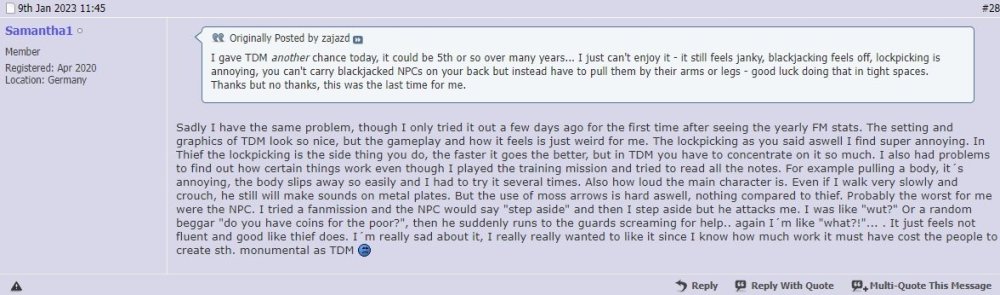
These frustrations are real and they are actively preventing people from playing the game. There are plenty more examples in the first post. The idea that TDM is "alive" but nothing can or should be done to help these players into the game doesn't make much sense to me. If I experience 0% of the frustrations described above and actively enjoy playing the game more will something be included as a option for me and these players? I think of Deus Ex: Mankind Divided which has a heavily revised control scheme to allow for more complex interactions, but allows you to select the Human Revolution controls if you prefer those. Nothing as far as two entirely separate control layers. But were there is an object interaction mode where you can pick between "TDM" which is how it is today and an "Classic" mode where these interactions are more intuitive for these players. Then at least they would have some hope of finding an answer in the options menu for them.
-
[Feature Proposal] Frob to Use World Item
Wellingtoncrab replied to Daft Mugi's topic in The Dark Mod
I don’t understand your point at all. In thief if a book is stationary frobbing it will read it. If it’s a inventory item you will pick it up and then you need to use it to read it. It is the exact same in TDM - is this too inconsistent? Why didn’t we change it? In thief bodies are primitive physics objects just like crates. Why did they not worry about whether this was inconsistent that the body didn’t first hover in front of the player instead of just shouldering it? Who knows - we weren’t in the room but as far as I can tell this has never confused anyone - where as it’s relatively easy to find examples of how tdms solutions are confusing and feel unnatural to players. TDM was created in response to negative feedback from the thief community about TDS. While I like the game TDS has notoriously bad game feel and it is disappointing to see people who love the games dismiss TDM using the same language and they never make it far enough with the game to see everything it has to offer. We have a lot offer. That is why it’s important to me as a player first and person who makes content for the game second. -
[Feature Proposal] Frob to Use World Item
Wellingtoncrab replied to Daft Mugi's topic in The Dark Mod
@wesp5at this point you can disagree with it - but are you really missing why there is an attempt to make the body shouldered with one click? Read the first post but readdressed a few times at this point -
[Feature Proposal] Frob to Use World Item
Wellingtoncrab replied to Daft Mugi's topic in The Dark Mod
This is exactly the dynamic of interacting with objects vs bodies in the game Thief and it does not confuse players. It is consistent in that frobbing an object does the primary interaction with said object: If it’s a crate pick it up If it’s a readable read it If it’s a switch flip it If it’s a door open it If it’s a body shoulder it I have never heard anyone describe this as inconsistent. This is false - clicking again unshoulders a body, just like it does in thief. This I would say there is some agreement - it would have been nice for the primary interaction with lit candles to be to snuff them out, but since unlit candles and candle holders are also physics objects that cannot be toggle lit, this is quite confusing when going to interact with unlit candles such as this array in the training mission As stated it is arguable the primary interactions of physics objects is to pick them up. -
[Feature Proposal] Frob to Use World Item
Wellingtoncrab replied to Daft Mugi's topic in The Dark Mod
Perhaps I am mistaken, but this seems to have been the position on other accessibility features not needing to be forward for existing players in places like the main menu as long as they are addressable by cvar? But they will at a minimum be able to move a body right away without sinking hours into the game thinking they can only drag them around. As far as the merits of double click vs long press it sounds like it is worth testing, but can’t say without feeling it out. Long press has been working fine on my end. -
[Feature Proposal] Frob to Use World Item
Wellingtoncrab replied to Daft Mugi's topic in The Dark Mod
It’s incredibly common in controller mapping - to the point even the game’s current controller implementation supports it. Not sure if switching this to a double click is additive or subtractive. What is getting lost is the primary interaction with a body imo is actually to shoulder it - not drag it. Obfuscating this behind a second input is clunky and confusing to new players. What is “intuitive” is a matter of perspective, but the current patched method of the initial click shouldering a body makes a lot more sense to me and actually addresses some of the complaints from new players as laid out in the initial post. There is a method via the delay cvar for experienced players who prefer the old system to restore it, so I am uncertain what the down side is really? -
I actually feel like they got a little better as time went on. They aren’t my favorite band or anything, but Nevermind, In Utero, and Unplugged are all great albums. Bleach is good but I never felt it was particularly great.
-
[Feature Proposal] New Lean for TDM 2.12
Wellingtoncrab replied to Daft Mugi's topic in The Dark Mod
I don’t really see why the best solution for the game should be some approximation of reality, nor do I think the old lean is more successful in this regard. You are not controlling your actual head or torso, you are controlling a video game camera. The slide lean is a more comfortable and meaningful camera position and if you are getting granular with the tap lean it actually gives you more control over how much of your body is actually exposed. With the angle tilt it can be hit or miss to gauge where you need to be in the game world relative to a corner in order to successful lean around it, especially when crouching. This leads to “lean, nudge position, lean” which I think is also not very realistic vs the real world where we have things like full body awareness and necks which allows us to rotate our “cameras” with a lot more flexibility. I find this also improved with the new lean. The result was for me, in conjunction with the new frob behavior, was a game that feels more predictable and responsive to play. This is imo the “main reason to love the change”, not that I perceived the game to be easier (I did not on my recent play through of A Bridge Too Far). In general my opinion is that making the game artificially cumbersome in pursuit of “realism” or less responsive to players inputs is a better way to make an experience more frustrating than it is a way to make it more challenging/rewarding. -
[Feature Proposal] New Lean for TDM 2.12
Wellingtoncrab replied to Daft Mugi's topic in The Dark Mod
[irony] Its a worm that makes crypto. Kind of like a silk worm, but instead of fabric it weaves jpegs of boring monkeys using you local ms paint install or something. I am not current on the technical details tbh but it’s nothing to be concerned about it. [/irony] -
[Feature Proposal] New Lean for TDM 2.12
Wellingtoncrab replied to Daft Mugi's topic in The Dark Mod
Here is a patched windows executable I compiled with both @Daft Mugi's lean and frob patches. I played through all of A Bridge Too Far with and it appears stable to me. [irony] The crypto mining worm I included is pretty light weight so you will only notice a modest FPS drop. [/irony] For what it's worth I think the new lean is an improvement. This combined with the frob changes made the game feel in general like there is less friction when I was trying to quickly snuff a candle, fire off an arrow, move a body quickly out of the way etc. -
Just finished. Wow this is a fantastic mission. The setting is so cool with an awesome sense of style, scale and atmosphere. Great design to with many avenues of approach and a great sense of interconnectedness and sense of humor. You did a great job.
-
@cugzkanias an aside I don’t really want to to steal valor from your testers. My comments in the beta thread were limited to encouraging you to recruit testers in main fan missions forum. While I appreciate the call out I don’t think it’s fair to receive any credit for testing the mission. Looking forward to playing it though!
-
Congratulations on the release!
-
@datiswous That was a joke. You asked for thoughts on switching the the thread to be about nirvana. There is a famous line from Smells Like Teen Spirit: “Oh well, whatever, nevermind.” where the name of the album and now this thread comes from.