Kerry000
-
Posts
84 -
Joined
-
Last visited
-
Days Won
1
Everything posted by Kerry000
-
For someone like myself who's creating assets, readables, voiceovers etc. in collaboration with a mapper working on the map file, I personally really enjoyed the convenience of GitHub. As someone who's never used Git for project management before, I got the hang of the basics pretty quickly. Essentially what is advantageous for me is that I can work on my own branch, adding new textures or models or xdata for the readables etc. without interfering in the mapper's work. I just update my branch with his progress as time goes on, and he then merges my branch into his main repository whenever I make progress on my side. The process has been pretty seamless for us. I enjoy that I can just merge my branch with the main repository and then immediately run TDM (and DMAP) to then see all my additions in place in the latest update of the work-in-progress FM. Saves us having to transfer files to one another just to test our work, and also keeps the whole thing safe in an online repository if one us makes a mess of things on our local computers.
-
The Hare in the Snare's videos are both 1080p with VBR (2 pass) encoding, at 30fps. I set the target bitrate to 3 Mbps (max 5) for both. Getting their total size down to 66Mb for 3 mins worth of video at 1080p illustrates the merits of sticking to the traditional (old) visual style. You're right that the intro we created could not have been done via GUI animations and it was actually heavily dumbed down and filtered in post to give it an almost monochrome "Thief" feel, but in hindsight the outro (debrief) video we did with static screenshots was the better of the two. It took 1/10th the amount of time to create. The trouble with trying to do that via GUI animation, however, is the creation of unique and artistic imagery. Even though our outro is static, much of the imagery required manually setting the scenes with inactive AI's and introducing cinematic camera angles, then cleaning up in post. I am sure it could be done with a GUI-based "movie maker", but boy are you going to spend forever creating a pool of reusable GUI assets that will soon become "same old". For what it's worth, my suggestion would be to first improve the implementation of in-game videos by making it more reliable. For the Hare in the Snare debrief we ended up filing two bug reports (though we have not yet had the time to provide @stgatilov with a test case) and we actually ended up creating our own unique scripts and GUI files to make it work properly. We also need to allow audio files to be played directly from the .mp4 (only the intro currently does this) to prevent the audio going out of sync when the Uncapped FPS setting is off. Finally, there needs to be a tutorial to show mappers how to do it with cinematic screenshots compiled into a dynamic video sequence. We would see more video work if people had a basic understanding of how to create them with all the free compositing and editing software available today, in combination with stylized screenshots. I personally think that would be a gentler learning curve than a GUI animation system. Video size, however, is really not an issue if you understand how to manage bitrate. There is no need for an 11Mbps bitrate on any TDM video. Not even Blu-ray requires that much. For stylized and dynamic screenshot sequences in .mp4 format, I don't see why anyone would need more than 5Mbps at 1080p, unless they were going for full colour with rapidly changing frames. But in the case of Hare in the Snare, variable framerates or drastic compression were not required at all. Those videos were longer and more detailed than 99% of FM's, yet were also a much smaller size than most.
-
Fan Mission: The Hare in the Snare, Part 1
Kerry000 replied to Frost_Salamander's topic in Fan Missions
Okay, thank you @Tarhiel, That means you missed two story-related secrets... -
Fan Mission: The Hare in the Snare, Part 1
Kerry000 replied to Frost_Salamander's topic in Fan Missions
@Gerberox, Yes, it was mentioned twice... -
Fan Mission: The Hare in the Snare, Part 1
Kerry000 replied to Frost_Salamander's topic in Fan Missions
-
Fan Mission: The Hare in the Snare, Part 1
Kerry000 replied to Frost_Salamander's topic in Fan Missions
Hi @Tarhiel, Thank you for taking the time to reply in such detail. I'll gladly answer the questions you've raised. You said you found 3 out of 5 secrets. May I ask which ones you found? Thank you again for your kind words. We worked very hard on the readables in order to make them engaging for the player. -
Fan Mission: The Hare in the Snare, Part 1
Kerry000 replied to Frost_Salamander's topic in Fan Missions
@Spyrano and @JackFarmer, Thank you both for the kind words and rest assured that we are hard at work on part 2. We're really glad to hear that you're looking forward to it @Tarhiel, Thank you for the glowing review, we truly appreciate it. Would you mind answering something for me so that we can gauge our development of the characters? Who did you want to kill in the mission? Did you want to kill them because of their involvement in the darker side of the plot, or do you usually enjoy killing characters in-game? It's important for us to create strong emotions in the player about certain characters whose stories are going to evolve along with the main plot. -
Fan Mission: The Hare in the Snare, Part 1
Kerry000 replied to Frost_Salamander's topic in Fan Missions
Hello @SeriousToni, To which footlocker are you referring? Captain Williams? We have not encountered this issue, so a little more info would be helpful. Are you saying the lockpicking function does not activate, or that the lockpicking itself is too difficult? Do you hear the usual lockpicking sound and see the small latch moving? -
Fan Mission: The Hare in the Snare, Part 1
Kerry000 replied to Frost_Salamander's topic in Fan Missions
Hello @vozka, Thank you for your feedback and the kind support. We appreciate the compliments Regarding your other comment.... -
Fan Mission: The Hare in the Snare, Part 1
Kerry000 replied to Frost_Salamander's topic in Fan Missions
Hi @MrMunkeepants, Glad you enjoyed the mission. Regarding the other entrance... The coal shortage in Bridgeport is a major plot point of the planned Hare in the Snare series, so the short answer is yes, there is much more to come. -
Fan Mission: The Hare in the Snare, Part 1
Kerry000 replied to Frost_Salamander's topic in Fan Missions
Hello @MrMunkeepants (lol), Here you go... -
Fan Mission: The Hare in the Snare, Part 1
Kerry000 replied to Frost_Salamander's topic in Fan Missions
Hi @Xolvix, I took the screenshots on my home PC, which is not new hardware. This FM is absolutely playable and was tested on various configurations (including an old laptop) during the beta phase. You might experience some frame drops here and there in the outdoor areas, but that's not unusual in any game. My recommendation would be to try it out and see what settings work best for you. My personal shadow settings for the screenshots were as follows: Shadows Implementation: Stencil Soft Shadow Quality: High Shadow Softness: Low (slider almost all the way to the left) -
Fan Mission: The Hare in the Snare, Part 1
Kerry000 replied to Frost_Salamander's topic in Fan Missions
A really nice compliment. Thank you very much, @Silverflame3 Part 2 is already underway, and both the characters you mention are an important part of it -
Fan Mission: The Hare in the Snare, Part 1
Kerry000 replied to Frost_Salamander's topic in Fan Missions
Hi @Bienie, Thank you for the great feedback. We think alike in terms of tight, detailed FM's so I'm glad you enjoyed it. The small oversights like clipping models and scaled textures are something we might look at in time. Regarding your other comments: Yes, Hales does not speak in the mission. The standard female voices are far too silly for someone like Hales, and in the absence of a female voice actor for TDM we chose to make her the strong silent type. Hales is all business, no nonsense. Having her ignore greetings made by the other staff etc. fits well with her character. Thanks again for playing @kin, thank you kindly. We're glad to hear that. @datiswous, not quite sure where that "purse" is, but I can see from the screenshot that it is not a coin purse. It looks to be one of those tobacco pouches, possibly? And if you get stuck trying to find a way into the manor, see the spoiler about it above (there are 2 ways in). -
Importing custom model. Wiki outdated. Please help!
Kerry000 replied to Kerry000's topic in TDM Editors Guild
Got it, thank you -
Importing custom model. Wiki outdated. Please help!
Kerry000 replied to Kerry000's topic in TDM Editors Guild
@OrbWeaverGetting the following error when installing your .ase export script (the other two import scripts installed okay). This is in Blender v2.80 and using the correct version (for 2.80) from the page you linked...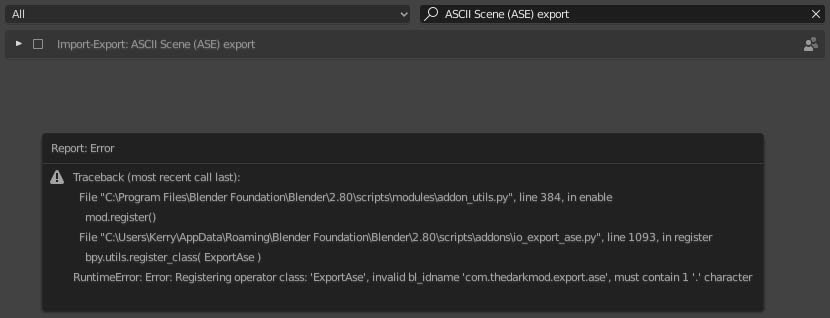
-
Importing custom model. Wiki outdated. Please help!
Kerry000 replied to Kerry000's topic in TDM Editors Guild
It was this one: https://github.com/DarklightGames/io_export_ase But I am so switching to yours from now on! -
Importing custom model. Wiki outdated. Please help!
Kerry000 replied to Kerry000's topic in TDM Editors Guild
Tadaa! Thank you @peter_spy and everyone else who helped ( @HMart) This is from peter_spy's test: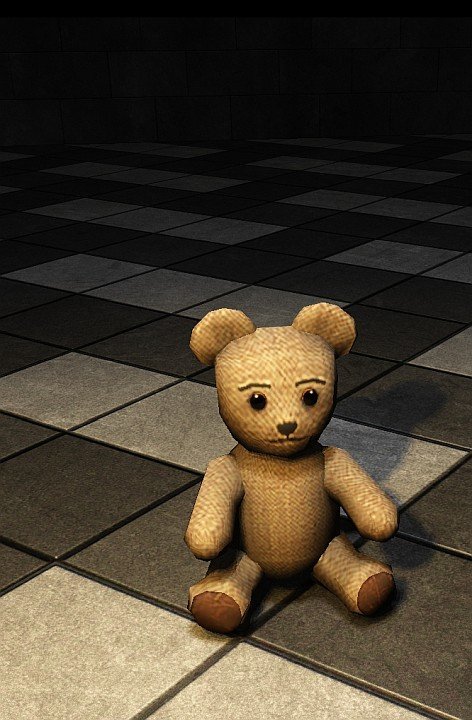
-
Importing custom model. Wiki outdated. Please help!
Kerry000 replied to Kerry000's topic in TDM Editors Guild
Understood, and thank you again. So, @peter_spysolved the problem in the interim. It was a few bad lines in the .ase (the programmer that wrote the plugin for Blender included things like "who cares" in his definitions, lol) but we have now got it all to work. I had already ensured the model was triangulated and exported with correct UV's. -
Importing custom model. Wiki outdated. Please help!
Kerry000 replied to Kerry000's topic in TDM Editors Guild
Okay, thank you. Sorry, I have no experience with DR. I suspect it's an issue that occurs when converting the fbx to either an ase or a lwo. We've now tried it with a lwo converted from the fbx in Lightwave, and as a ase converted from the fbx in Blender. It looks great in the editor, but then never runs in-game. The textures work (@peter_spy tried them on a different mesh), it's just the model. Something must be getting lost during the conversion from fbx -
Importing custom model. Wiki outdated. Please help!
Kerry000 replied to Kerry000's topic in TDM Editors Guild
Got you. Thanks again for the help. Have just decided to use ASE model, rather than .lwo, in order to simplify the whole process. -
Importing custom model. Wiki outdated. Please help!
Kerry000 replied to Kerry000's topic in TDM Editors Guild
@OrbWeaver, does the material name in the modeling application need to include the folder path, or just the name itself? (ie. redbrick_with_mortar versus textures/darkmod/stone/brick/redbrick_with_mortar) EDIT: Never mind, I figured it out -
Importing custom model. Wiki outdated. Please help!
Kerry000 replied to Kerry000's topic in TDM Editors Guild
Thank you, @OrbWeaver. I'll give it a try. -
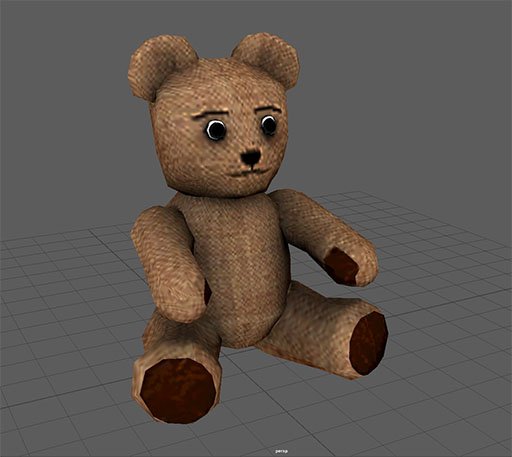
All I want to do is import a basic, static model into the editor. The model is in .lwo format, the polygons are all triangles, the UV's are all mapped correctly. I am not a modelling noob. The textures are all square, and in .dds format. The model does not need a collision mesh or a shadow mesh. It is just a small teddy bear. The problem is that I do not know how to associate a material with this custom model in DR. And in the wiki, which is so out of date now, there is a page that specifically deals with this issue but the example images do not load! Does anyone have the example images from this page? https://wiki.thedarkmod.com/index.php?title=Model/Texture_Guidelines Because I see that I need the path info for the model textures to be embedded in the .lwo mesh file, but the example of the path I'm supposed to use does not load in the wiki. Or maybe someone could please just give me a short description of how to import custom models into DR? I am an experienced modeler and texture artist, so no need to ELI5, it's just associating the custom model with a material file in DR that I cannot find any info on. EDIT: Is it something to do with entity .def files? https://wiki.thedarkmod.com/index.php?title=DEF_Files
-
I found a teddy bear...